
Just a heads up - the video contains flashing lights.
Quick tip - to adjust the sound, select the speaker icon. To view the video in full screen, click the button with four arrows located at the bottom of the video to the far right.
Instructions:
-
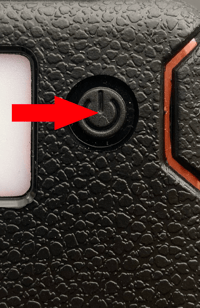
Press and hold the power button located in the center for 3 seconds (refer to the photo below).
-
Press the button once to activate strobe mode 1.
-
Press the button again to activate strobe mode 2.
-
To turn off the flashlight, press and hold the power button for 3 seconds.
Press and hold the power button located in the center for 3 seconds (refer to the photo below)
Press the button once to activate strobe mode 1.
Press the button again to activate strobe mode 2.
To turn off the flashlight, press and hold the power button for 3 seconds.
Pro tip: If you experience difficulty pressing the button due to limited finger strength, you can use the tip of the carabiner attached to the QuadraPro.
Thanks for choosing Survival Frog! We hope this helped and please don't hesitate to reach out with any further questions. 🐸